ZED Open Capture API
The ZED Open Capture library allows the low level control of ZED, ZED Mini and ZED 2 camera. The library provides methods to access raw video frames, to control the video parameters and to acquire raw data from the internal sensors (only ZED Mini, ZED2, and ZED2i). A synchronization mechanism is provided to get the correct sensor data associated to each video frame.
Note: The provided data are not calibrated, images are not rectified in a stereoscopic way, IMU data may drift or be misaligned. Calibration data can be accessed using the ZED SDK.
Coordinates system
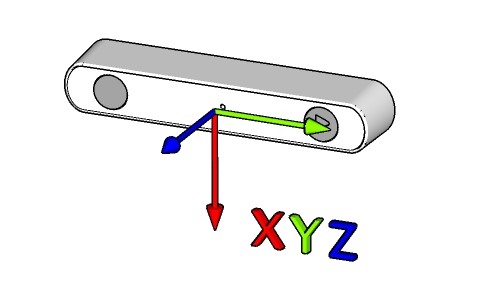
The coordinate system is only used for sensors data (especially for IMU). The given IMU data are expressed in the RAW/IMU coordinate system as show below
Installation
Prerequisites
Linux OS [Tested on Ubuntu 16.04, 18.04 and 20.04]
GCC compiler [at least v7.5]
CMake build system [at least v3.1]
HIDAPI and LIBUSB Libraries for USB communication
OpenCV [at least v3.4. Required only by examples]
git [if installing from source]
Install prerequisites
Install GCC compiler and build tools
$ sudo apt install build-essentialInstall CMake build system
$ sudo apt install cmakeInstall HIDAPI and LIBUSB libraries:
$ sudo apt install libusb-1.0-0-dev libhidapi-libusb0 libhidapi-devInstall OpenCV to compile the examples
$ sudo apt install opencv-dev
Install the udev rule
To be able to access the USB you must install the udev rule contained in the udev folder:
$ cd udev
$ bash install_udev_rule.sh
$ cd ..
$ udevadm trigger
Clone the repository
$ git clone https://github.com/stereolabs/zed-open-capture.git
$ cd zed-open-capture
Compile
Compile library and examples
$ mkdir build
$ cd build
$ cmake ..
$ make -j$(nproc)
Compile only the library
$ mkdir build
$ cd build
$ cmake .. -DBUILD_EXAMPLES=OFF
$ make -j$(nproc)
Compile only the video library with the video examples
$ mkdir build
$ cd build
$ cmake .. -DBUILD_SENSORS=OFF
$ make -j$(nproc)
Compile only the video library
$ mkdir build
$ cd build
$ cmake .. -DBUILD_SENSORS=OFF -DBUILD_EXAMPLES=OFF
$ make -j$(nproc)
Compile only the sensors library with the sensors example
$ mkdir build
$ cd build
$ cmake .. -DBUILD_VIDEO=OFF
$ make -j$(nproc)
Compile only the sensors library
$ mkdir build
$ cd build
$ cmake .. -DBUILD_VIDEO=OFF -DBUILD_EXAMPLES=OFF
$ make -j$(nproc)
Install
After compiling it is possible to install the library and the examples.
From inside the build folder:
$ sudo make install
$ sudo ldconfig
Local documentation
Documentation can be locally generated in HTML format using Doxygen:
$ sudo apt-get install -y doxygen # if not previously installed
$ cd doc
$ ./generate_doc.sh
The local documentation will be available opening the file doc/html/index.html with a standard web browser.